
Recently, I delivered a solution to a client—a financial secretary to a small cooperative society. It wasn't the kind of project that makes headlines, but it was the kind that quietly transforms someone's daily life. And honestly, those are my favorite.
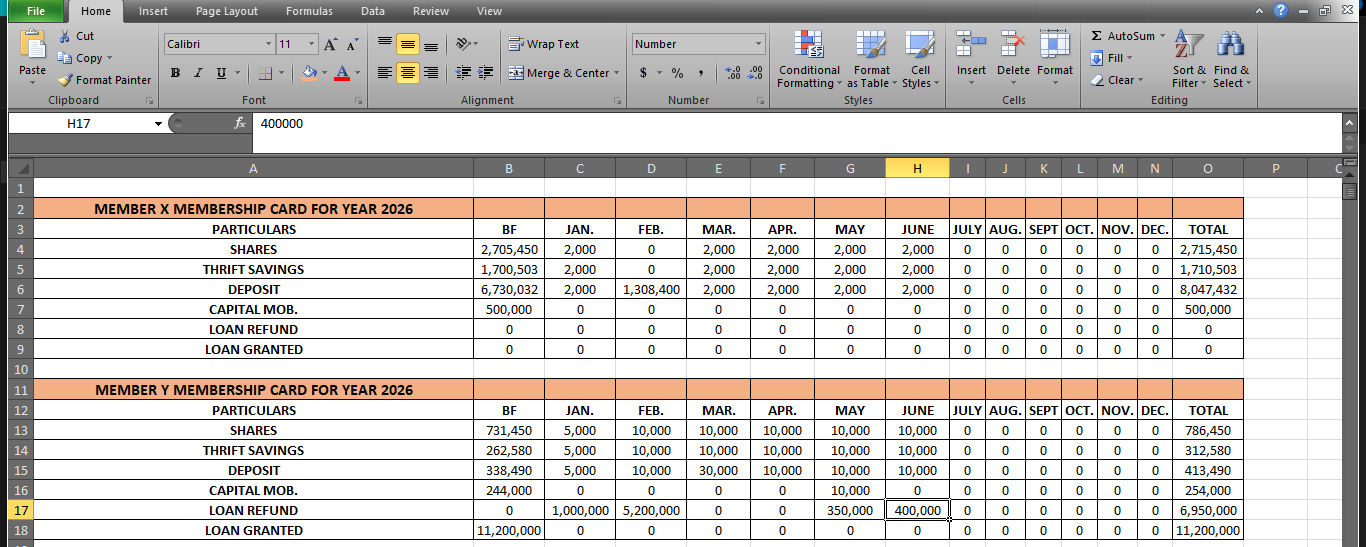
The challenge was straightforward to describe but punishing to live with. Every month, my client had to generate membership cards from a monthly contribution sheet for each member. Then, at the end of the year, he had to update a personal ledger sheet using the sum of the balance brought forward from the previous year and each month of the current year. On paper, this sounds like a job for a simple =SUM() formula. And my client, who already knew his way around Excel, had tried exactly that.
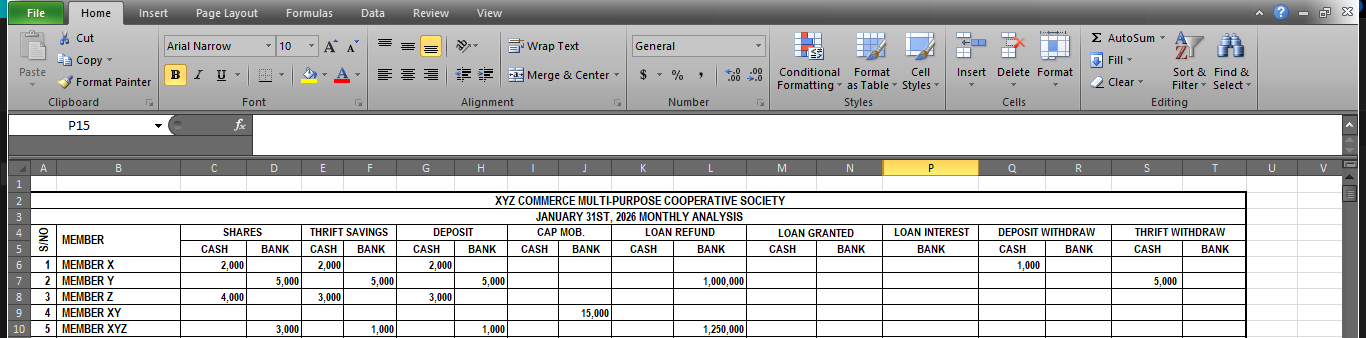
The problem is that most times, real-world data layouts don't arrange themselves to suit a clean formula. The data wasn't arranged in a neat, formula-friendly grid. Member names ran down a column, which was fine. But the particulars—SHARES, THRIFT SAVINGS, DEPOSIT, and so on—were arranged row-wise. And underneath each particular, like SHARES, sat two sub-rows: CASH and BANK. To get the total for SHARES, you needed to sum CASH and BANK first, then carry that result into the membership card. Dragging a cell formula across, the normal way people automate Excel, produced incorrect results. The relative references would shift in ways that didn't match the data structure. So my client was stuck doing it manually. Cell by cell. Member by member. Month after month.
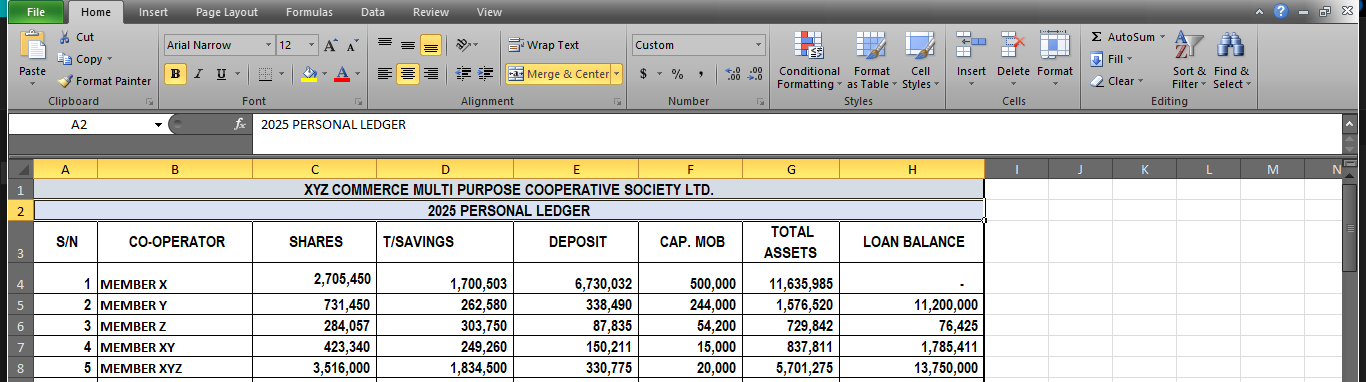
The second challenge was the Personal Ledger sheet. At year-end, every member's financial standing needed to be summarized from their membership card—brought forward balance plus twelve months of contributions, savings, deposits, and loan activity. Again, a formula that worked for one member wouldn't drag cleanly to the next. The layout broke the automation. So the ledger update, which should have been a quick calculation, became another manual marathon.
When my client explained this to me, I didn't just hear a technical problem. I heard fatigue. I heard the quiet frustration of someone who knew what needed to be done, understood Excel well enough to attempt it, and yet was still spending hours on work that a properly designed system should handle in seconds.
That's where I come in. Not just with code, but with a way of looking at the problem differently.
I developed a Visual Basic Application (VBA) solution embedded right inside his existing Excel workbook. I didn't ask him to migrate to a new platform or learn a new tool. His data stayed where it was. His sheets kept their familiar names. I simply added intelligence on top of what he already had.
The VBA solution does what a dragged formula could never do reliably with that data structure. It programmatically locates each member, reads their monthly contributions across all particulars, correctly sums the CASH and BANK sub-rows, pulls the brought-forward balance, and populates a professionally formatted membership card. All with a single click. For one member. Or for all members at once.
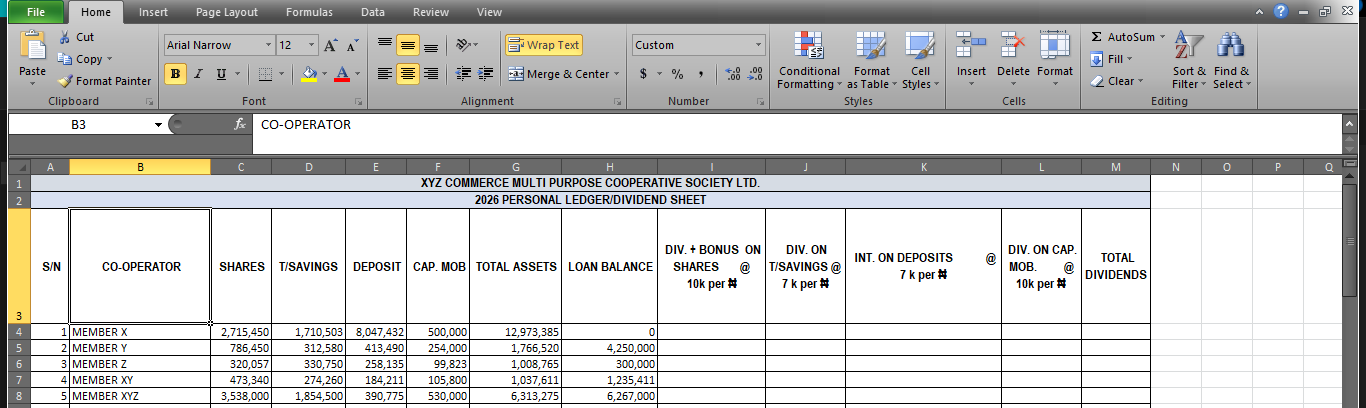
The same logic extends to the Personal Ledger. The system calculates year-end totals, loan balances, and total assets for each member automatically. No manual summing. No dragging formulas and praying they reference the right cells. No staying up late the night before a general meeting trying to finish reports that should have been ready days ago.
What makes this solution work isn't that I used VBA instead of formulas. It's that I respected the actual structure of the client's data and built logic that adapts to it, rather than forcing the client to restructure years of records to suit a formula. The automation bends to the human reality, not the other way around.
This project, like many I deliver, sits at the intersection of listening and building. The technical solution is almost always the easier part. The harder part—the part I take pride in—is truly understanding the workflow, the data structure, the existing skill level of the people involved, and designing something that feels less like a software implementation and more like a natural, welcome upgrade to how things already work.
I build these solutions using whatever tool fits the context. Sometimes it's Excel VBA, because the client lives inside Excel and the solution should meet them where they are. Sometimes it's Python, when data processing needs to happen at scale or on a schedule. Sometimes it's Google Apps Script, when the team is distributed and cloud-native. Sometimes it's a custom web application. The technology serves the problem. Never the other way around.
If your organization is wrestling with processes that should be simple but have been made complicated by messy data layouts, manual repetition, or tools that almost—but don't quite—work, I'd be glad to have a conversation. I don't lead with a pitch. I lead with questions. I want to understand what you're dealing with before I suggest anything.
Feel free to reach out at charles@ugbosu.com. I'd love to hear about the process that's been quietly stealing your team's time.
📖 ALSO READ: The Art of Business Optimization: Why 'Good Enough' Is Not Enough